Let's talk about the elephant in every recruiting budget: LinkedIn Recruiter.
At $10K-$15K per seat per year (and climbing about 15% annually), it's the single biggest line item for most recruiting teams. And look, it's a solid product. The talent pool is unmatched. But that price tag hurts, especially when half your team barely uses InMails and the other half wishes the search filters were smarter.
So what are your options? I went through the major alternatives and broke down what each one actually does, what it costs, and where it shines or falls short.
Quick note on this list
Some of these tools replace LinkedIn Recruiter entirely. Others complement it. I'll be clear about which is which for each tool so you don't buy something expecting it to do something it doesn't.
LinkedIn Recruiter: The Baseline
Before we look at alternatives, let's establish what you're paying for with LinkedIn Recruiter in 2026:
- Recruiter Lite: ~$170/month ($1,680/year). 30 InMails/month. Basic search filters. Good enough for individual recruiters with low volume.
- Recruiter Professional/Corporate: $750-$1,250/month ($9K-$15K/year). 150 InMails/month. Advanced filters, pipeline management, team collaboration.
The big thing LinkedIn has going for it: the data lives there. 1 billion profiles, kept relatively up to date by the users themselves. Nobody else has that. Every alternative is either pulling from LinkedIn data anyway, or building their own database.
1. Screener AI
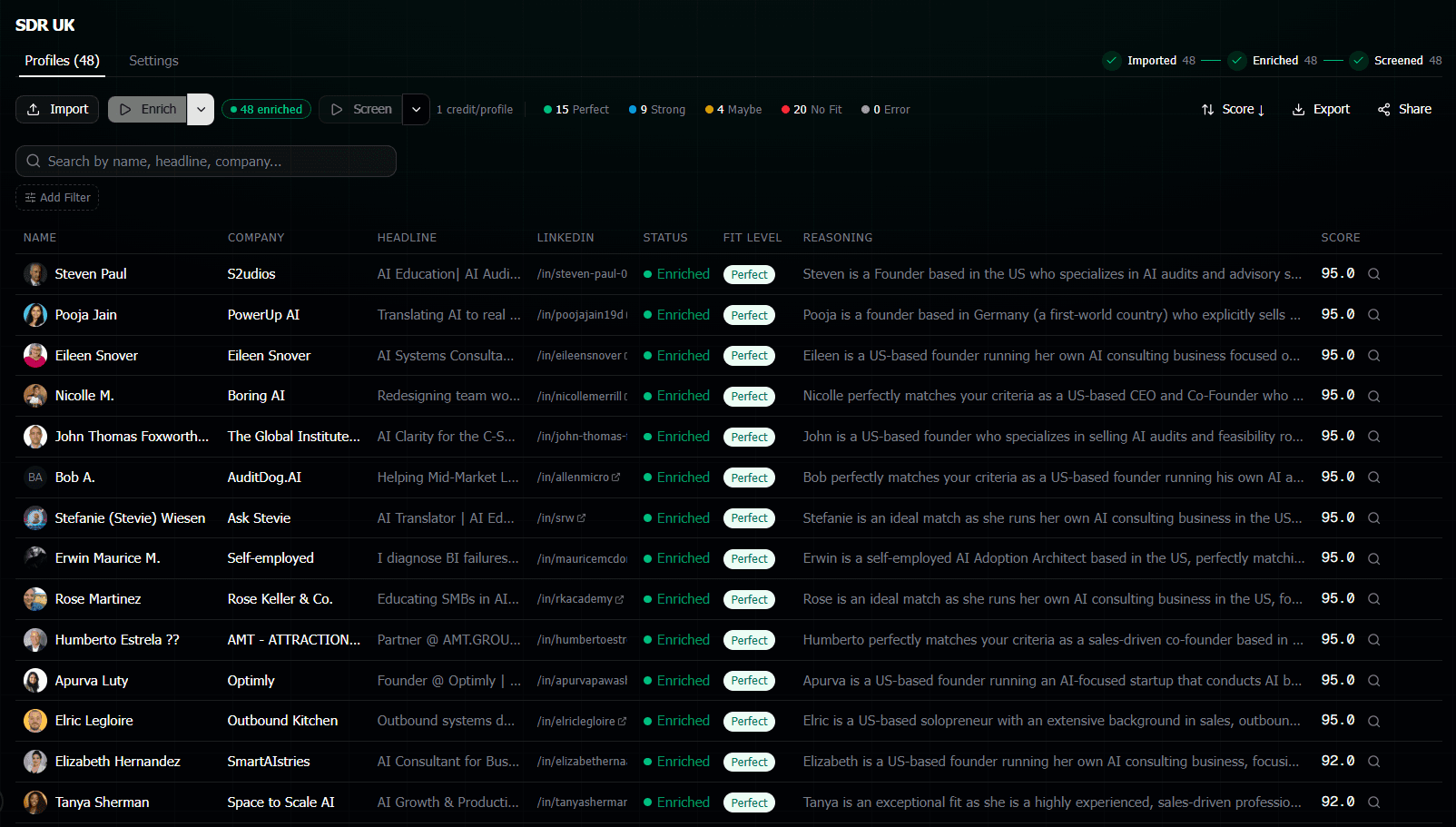
What it does:AI-powered candidate screening and scoring. You give it LinkedIn URLs, write what you're looking for in plain English, and it scores every candidate 0-100 with written reasoning.
What it does NOT do:Source candidates. It's not a search tool. You bring the profiles, it evaluates them.
Pricing
Pay-as-you-go credits. No subscription, no per-seat fees. Packs range from 300 credits for $9 to 6,000 credits for $99. One credit to enrich a profile, one credit to screen it. So screening 200 candidates costs about $12. Plus 50 free credits when you sign up.
Pros
- Way cheaper than anything else on this list
- Natural language criteria (no Boolean, no filters to configure)
- Written reasoning for every score, not just a number
- Anonymous sharing mode for agencies doing blind presentations
- No monthly commitment. Pay only when you use it
Cons
- Not a sourcing tool. You need to find candidates somewhere else first
- Relatively new product compared to the big players
- Doesn't have CRM or outreach features (screening only)
Best for
Recruiters and agencies who already have candidate lists (from LinkedIn, job boards, referrals) and need to evaluate them fast. Pairs well WITH LinkedIn Recruiter for search + AI for evaluation.
2. HireEZ
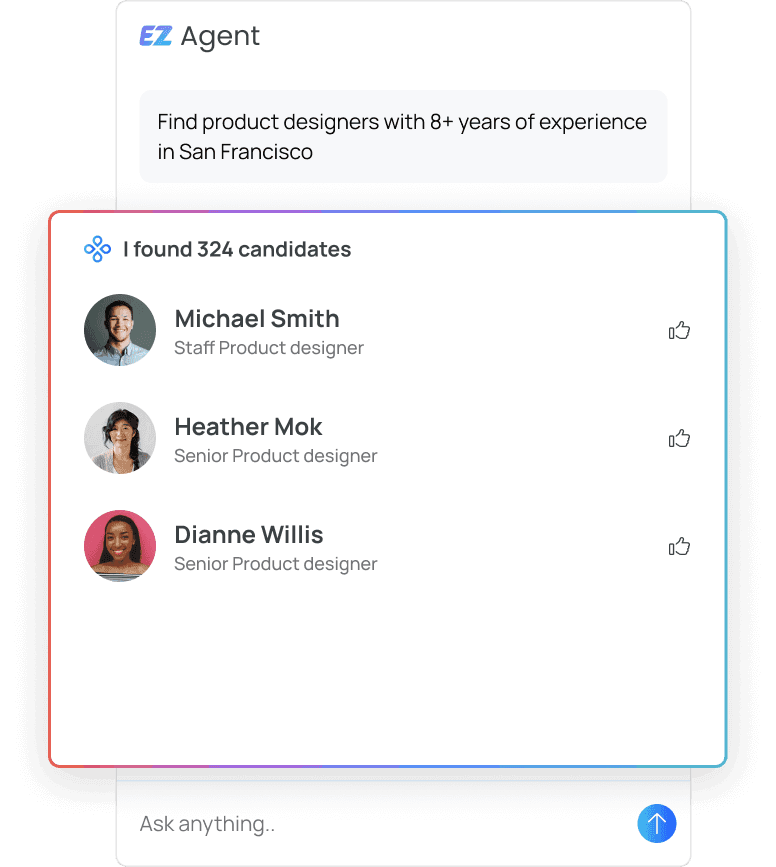
What it does:AI sourcing platform with a big candidate database (800M+ profiles). Has an "EZ Agent" that finds candidates based on natural language requests. Also does outreach sequences and analytics.
Pricing
Starts around $169-$199/user/month on annual contracts. Enterprise deals typically run $13K-$25K/year. Not published on the website, so you'll need to talk to sales. Credits are used for sourcing and revealing contact info.
Pros
- Massive candidate database across multiple sources
- AI agent handles sourcing in natural language
- Built-in outreach and email sequences
- Good analytics and reporting dashboards
Cons
- Price adds up fast, especially with credit overages
- Requires annual contract (no month-to-month)
- Learning curve is steeper than simpler tools
- Contact data accuracy can vary
Best for
Mid-size to large recruiting teams who want a full sourcing platform to replace or supplement LinkedIn Recruiter. Not the cheapest option but covers a lot of ground.
3. SeekOut
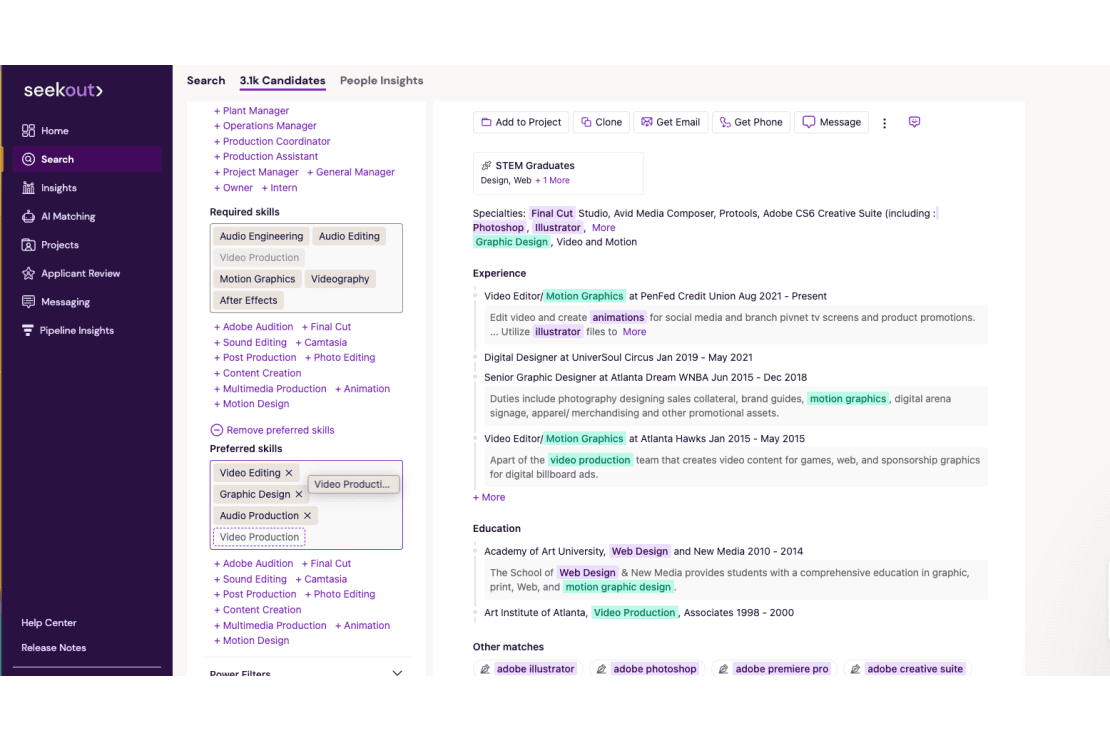
What it does:AI recruiting platform focused on sourcing, screening, and engaging talent. Has a 1B+ profile database with strong diversity sourcing features. Positions itself as an "agentic AI" recruiting platform.
Pricing
Starts at roughly $2,150/year for the Professional plan (individual sourcers). Enterprise plans run $10K-$30K+/year. Like most enterprise tools, pricing is custom and negotiable. They do offer a free trial.
Pros
- Strong diversity and inclusion sourcing features
- 1B+ profile database with deep technical talent data
- AI-powered screening and candidate ranking
- Integrates well with major ATS platforms
- Free trial available (no credit card)
Cons
- Enterprise pricing is steep for small teams
- Best features locked behind higher-tier plans
- Focused heavily on tech recruiting (less useful for other industries)
- Sales-led pricing means you can't just sign up and go
Best for
Enterprise companies with dedicated recruiting teams, especially those with diversity hiring goals. The Professional plan works for solo sourcers who want a LinkedIn Recruiter Lite alternative.
4. Apollo.io
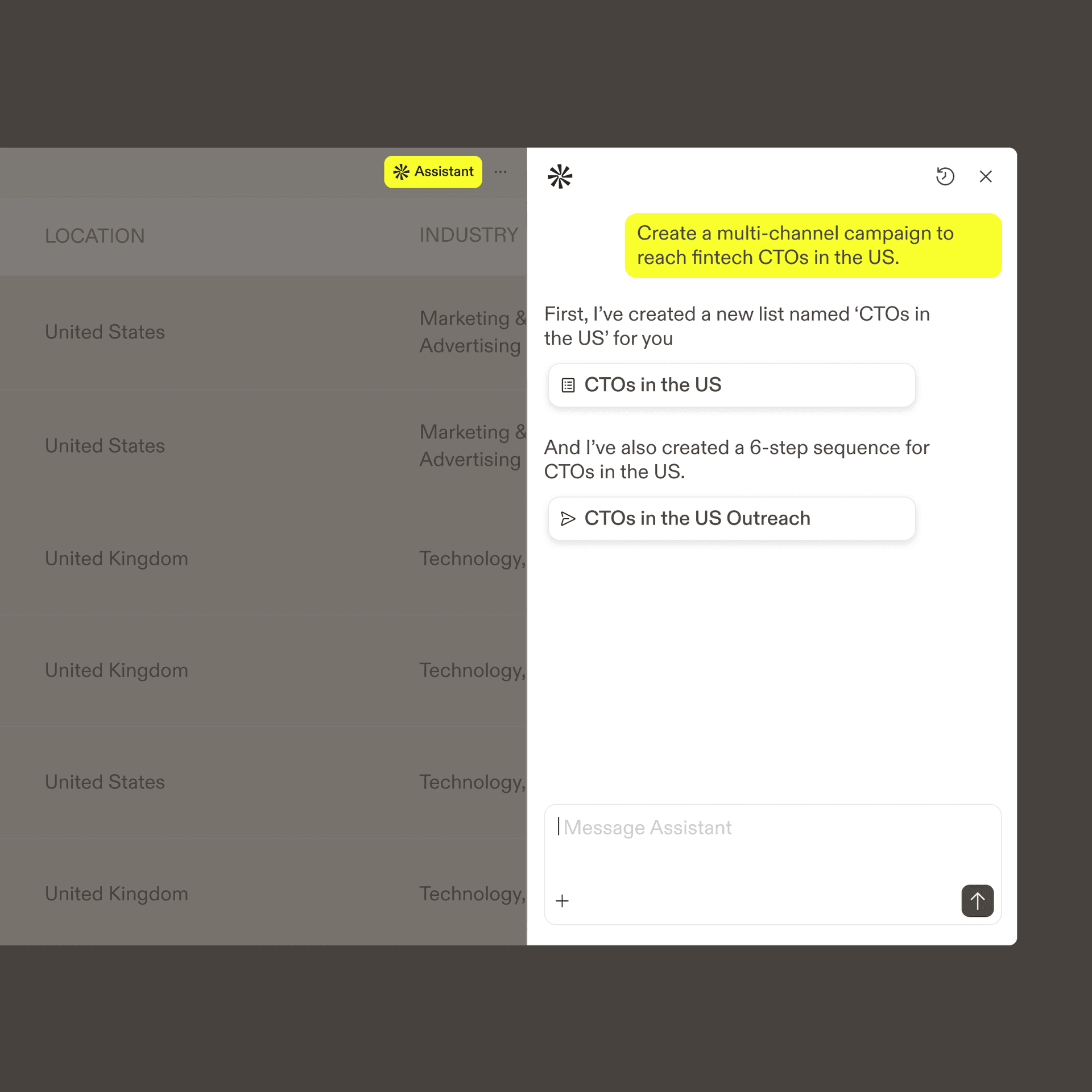
What it does: Originally a sales intelligence and outreach platform, but many recruiters use it for sourcing. Has a massive contact database with emails and phone numbers. Strong at building prospect lists and running outreach sequences.
Pricing
Free plan available with limited credits. Basic: $49/user/month. Professional: $79/user/month. Organization: $119/user/month. All billed annually. But watch out for credit overages. Real-world cost for active recruiters often hits $150-$400/user/month.
Pros
- Has a genuinely useful free tier to start
- Direct emails and phone numbers (not just LinkedIn InMails)
- Excellent outreach automation and sequences
- Cheaper entry point than most recruiting-specific tools
Cons
- Built for sales, not recruiting. Missing recruiting-specific features
- Contact data accuracy is hit or miss (especially email)
- Credits expire at end of billing cycle
- No candidate evaluation or scoring features
- Phone number credits cost 8x more than email credits
Best for
Budget-conscious recruiters who primarily need contact data and outreach tools. Works well as a sourcing complement if you don't want to pay for InMails. Not a full recruiting platform though.
5. Hyperscan
What it does: AI-powered tool for analyzing LinkedIn profiles at scale. You give it criteria and it scans thousands of profiles, similar to Screener AI but with access to its own database of 1B+ professionals. No LinkedIn account or Recruiter license needed.
Pricing
Includes 10,000 AI profile scans per user/month on their standard plans. Specific pricing isn't published on their website. Custom Team plans available for high-volume users (50K+ scans). You'll need to contact them for a quote.
Pros
- Huge scan volume included (10K profiles/month)
- Own database, so no dependency on having a LinkedIn account
- AI-based profile analysis and ranking
- Good for high-volume screening use cases
Cons
- Pricing not transparent (have to talk to sales)
- Relatively newer player in the space
- Limited information available about detailed feature set
- No free tier mentioned publicly
Best for
High-volume recruiting teams that need to scan thousands of profiles regularly and want their own database access instead of relying on LinkedIn search.
Sourcing vs Screening: Know the difference
Some tools help you FIND candidates (sourcing). Others help you EVALUATE candidates you already have (screening). LinkedIn Recruiter does both but isn't great at either anymore. The best setup in 2026 might be combining a sourcing tool with a dedicated screening tool instead of relying on one platform to do everything.
6. Gem
What it does: All-in-one recruiting platform with CRM, sourcing, outreach, scheduling, and analytics. Positions itself as the complete recruiting OS. Strong on nurturing passive candidates over time.
Pricing
Starts at $270/month billed annually ($300 monthly). Enterprise pricing is custom. They have a startup program: 6 months free, then 50% off the first paid year for companies under 100 employees. So startups could get started at around $135/month.
Pros
- True all-in-one platform (CRM, sourcing, outreach, scheduling, analytics)
- Excellent candidate nurturing and drip campaigns
- Strong ATS integrations (Greenhouse, Lever, etc.)
- Great startup program pricing
- Includes Metaview Pro for interview intelligence
Cons
- Expensive for small teams outside the startup program
- Lots of features means a learning curve
- Enterprise pricing is sales-gated and opaque
- Overkill if you just need sourcing or just need screening
Best for
Growing companies that want to consolidate their recruiting stack into one platform. The startup program makes it accessible for early-stage teams. Enterprise companies that want everything under one roof.
How to Choose the Right Alternative
It depends entirely on what you actually need. Here's a quick decision framework:
On a tight budget?
Apollo (free tier + $49/mo) for sourcing. Screener AI (pay-per-use) for evaluation. Under $60/month total.
Need to evaluate fast?
Screener AI if you already have profiles to screen. Write your criteria, get scores in 5 minutes.
Enterprise with big budgets?
SeekOut or HireEZ for full-platform sourcing. Gem if you want CRM and outreach built in too.
High volume screening?
Hyperscan or Screener AI. Both handle thousands of profiles with AI analysis.
The Bottom Line
LinkedIn Recruiter is still the default for a reason. The data is there. But the pricing is getting harder to justify, especially when specialized tools do individual parts of the workflow better and cheaper.
My honest take? Most teams in 2026 are better off with a combination of tools than one $15K/seat platform. Use LinkedIn Recruiter Lite (or even just Sales Navigator) for search, pair it with a dedicated screening or outreach tool, and you'll get better results for a fraction of the cost.
Or just use the free tiers and pay-per-use options to test everything on this list before committing. Most of these tools let you try them without an annual contract.
Frequently Asked Questions
Can any of these tools fully replace LinkedIn Recruiter?
Depends what you use Recruiter for. If it's mainly for searching profiles, then yes, tools like HireEZ and SeekOut have their own databases. If you rely on InMails, you'll still need some LinkedIn presence. Most recruiters end up keeping Recruiter Lite and supplementing with other tools rather than replacing it entirely.
Which alternative is cheapest?
Apollo has a free tier, and Screener AI is pay-per-use starting at $9 for 300 credits. Both are dramatically cheaper than LinkedIn Recruiter. But "cheapest" depends on your volume. At 10K+ profiles per month, the per-credit costs add up and a flat-rate platform might make more sense.
Do these tools work with LinkedIn Sales Navigator?
Most of them complement Sales Navigator well. You can use Navigator to build candidate lists, export the URLs, and then use tools like Screener AI or Hyperscan to evaluate them. HireEZ and SeekOut have their own search so you might not need Navigator at all.
Are these tools safe to use with my LinkedIn account?
Tools that scrape LinkedIn directly with your account credentials put your profile at risk. The tools on this list either use their own databases (HireEZ, SeekOut, Hyperscan) or pull public profile data through APIs (Screener AI). None of them log into your LinkedIn account.
What's the best combo of tools for a small recruiting agency?
LinkedIn Recruiter Lite ($170/mo) for finding candidates. Screener AI (pay-per-use) for evaluating them with shareable anonymous reports for clients. Apollo ($49/mo) if you want direct emails for outreach. Total cost: around $220/month + a few dollars per screening run. Compare that to $800+/month for a single corporate Recruiter seat.